
Mybatis配置多數(shù)據(jù)源
<!-- 數(shù)據(jù)庫--><!-- https://mvnrepository.com/artifact/mysql/mysql-connector-java --><dependency><groupId>mysql</groupId><artifactId>mysql-connector-java</artifactId><version>8.0.26</version></dependency><!-- orm--><!-- https://mvnrepository.com/artifact/org.mybatis/mybatis --><dependency><groupId>org.mybatis</groupId><artifactId>mybatis</artifactId><version>3.5.7</version></dependency><!-- orm spring--><!-- https://mvnrepository.com/artifact/org.mybatis/mybatis-spring --><dependency><groupId>org.mybatis</groupId><artifactId>mybatis-spring</artifactId><version>2.0.6</version></dependency><!-- 數(shù)據(jù)源--><!-- https://mvnrepository.com/artifact/com.alibaba/druid --><dependency><groupId>com.alibaba</groupId><artifactId>druid</artifactId><version>1.2.6</version></dependency><!-- https://mvnrepository.com/artifact/org.springframework/spring-jdbc --><dependency><groupId>org.springframework</groupId><artifactId>spring-jdbc</artifactId><version>5.3.9</version></dependency>
public class MybatisConfig {public DruidDataSource getDruidDataSource(String url,String userName,String password) throws SQLException {DruidDataSource ds = new DruidDataSource();ds.setUrl(url);ds.setUsername(userName);ds.setPassword(password);try {ds.setFilters("stat,mergeStat,slf4j");} catch (Exception var18) {}ds.setMaxActive(50);ds.setInitialSize(1);ds.setMinIdle(1);ds.setMaxWait(60000);ds.setTimeBetweenEvictionRunsMillis(120000);ds.setMinEvictableIdleTimeMillis(300000);ds.setValidationQuery("SELECT 'x'");ds.setPoolPreparedStatements(true);ds.setMaxPoolPreparedStatementPerConnectionSize(30);ds.setTestWhileIdle(true);ds.setTestOnReturn(false);ds.setTestOnBorrow(false);ds.init();return ds;}(name = "dataO")public SqlSessionFactoryBean getSqlSessionFactoryOne1() throws Exception {//xml和實體的映射SqlSessionFactoryBean sqlSessionFactoryBean=new SqlSessionFactoryBean();sqlSessionFactoryBean.setDataSource(getDruidDataSource("jdbc:mysql://127.0.0.1:3306/tianjl?useUnicode=true&characterEncoding=UTF-8&zeroDateTimeBehavior=convertToNull&transformedBitIsBoolean=true","root","tianjingle"));sqlSessionFactoryBean.setTypeAliasesPackage("com.example.demo.one");Resource[] resources = new Resource[]{new ClassPathResource("tian/one/OneMapper.xml")};sqlSessionFactoryBean.setMapperLocations(resources);return sqlSessionFactoryBean;}(name = "dataTwo")public MapperFactoryBean getSqlSessionFactoryTwo() throws Exception {//xml和實體的映射SqlSessionFactoryBean sqlSessionFactoryBean=new SqlSessionFactoryBean();sqlSessionFactoryBean.setDataSource(getDruidDataSource("jdbc:mysql://127.0.0.1:3306/tianjl?useUnicode=true&characterEncoding=UTF-8&zeroDateTimeBehavior=convertToNull&transformedBitIsBoolean=true","root","tianjingle"));sqlSessionFactoryBean.setTypeAliasesPackage("com.example.demo.two");sqlSessionFactoryBean.setMapperLocations(new ClassPathResource("tian/two/TwoMapper.xml"));//單個數(shù)據(jù)源所有的數(shù)據(jù)庫映射MapperFactoryBean mapperFactoryBean=new MapperFactoryBean();//設置sqlSessionTemplate,zhuru yong demapperFactoryBean.setMapperInterface(TwoMapper.class);mapperFactoryBean.setSqlSessionFactory(sqlSessionFactoryBean.getObject());return mapperFactoryBean;}(name = "dataO")public static MapperScannerConfigurer mapperScannerConfigurer(){MapperScannerConfigurer mapperScannerConfigurer=new MapperScannerConfigurer();mapperScannerConfigurer.setBasePackage("com.example.demo.one.mapper");//這塊指定掃描的接口mapperScannerConfigurer.setSqlSessionFactoryBeanName("dataO");return mapperScannerConfigurer;}}
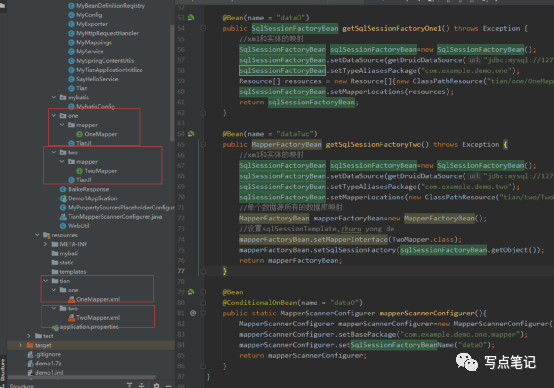
@Resourceprivate OneMapper oneMapper;@Resourceprivate TwoMapper twoMapper;@GetMapping(value = "/one")public BaikeResponse one(){BaikeResponse baikeResponse=new BaikeResponse();baikeResponse.setData(oneMapper.one());return baikeResponse;}@GetMapping(value = "/two")public BaikeResponse two(){BaikeResponse baikeResponse=new BaikeResponse();baikeResponse.setData(twoMapper.two());return baikeResponse;}
評論
圖片
表情